

 NinjaCalc
LabJack

LabJack is a company that produces data acquisition systems (DAQs).
Drivers
LabJack provides drivers for a variety of operating systems and CPU architectures. The following table shows the drivers for each LabJack model, categorized by operating system.1
| LabJack Model | Windows | Linux | macOS |
|---|---|---|---|
| U3, U6, UE9 | UD library | Exodriver | Exodriver |
| U12 | U12 Windows Installer | ljacklm | ljacklm |
| T4, T7 | LJM library | LJM library | LJM library |
ljacklm is a higher level library that requires Exodriver.
LabJack also maintains the Python library called LabJackPython. It is cross-platform and runs on Windows, Linux and macOS. It uses the UD and U12 drivers on Windows, and the Exodriver on Linux and macOS. It doesn’t support the T4 and T7 which require the LJM library. For that, use the Python_LJM library.
For documentation on the LabJackPython, it is recommended that you read the docstrings in the source code.
Installing Exodriver on Linux
Make sure you have build-essential and libusb-1.0-0-dev installed:
sudo apt install -y build-essential libusb-1.0-0-devClone the Exodriver repository:
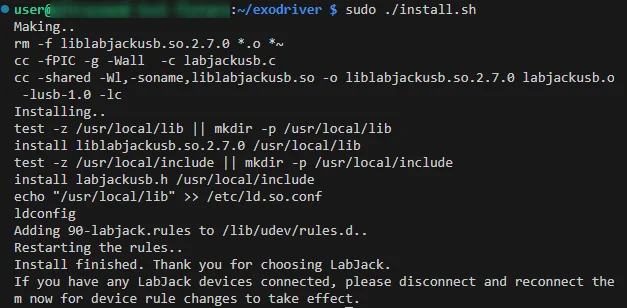
git clone https://github.com/labjack/exodriver.gitcd into the repository and run the install script:
cd exodriver./install.shThe build/install should only take seconds to complete.
LabJack U3
The LabJack U3 comes in a low voltage (U3-LV) and high voltage (U3-HV) version. The LV/HV refers to the analogue input voltage range. The U3-LV has a or analogue input voltage range, while the U3-HV has a or analogue input voltage range.2
All of the digital I/O pins on the U3 have 3 possible states: input, output-high and output-low. When configured as an input, there is always a pull-up resistor connected to 3.3V. When configured as an output, the pin is either connected to 3.3V or GND through a small series resistor.
Here is a Python example showing basic control of a U3 using the LabJackPython library.
import u3
# Create a U3 device object. By default, autoOpen=True which means the first U3 will be found and opened automatically.device = u3.U3()# Set pin high. NOTE: This also sets the pin as an output# EIO0 is pin 8. Mapping is:# 0 - 7   = FIO0 - FIO7# 8 - 15  = EIO0 - EIO7# 16 - 19 = CIO0 - CIO3device.setDOState(8, 1)
If you want to open a specific U3, you can pass autoOpen=False to the U3() constructor and then pass in the serial number to open():
device = u3.U3(autoOpen = False)device.open(serial = 320095789) # Open specific U3LabJack U6
The LabJack U6 has 20 digital I/O. The pins MIO0-MIO2 are multiplexed with the CIO0-CIO2 pins3.
The following bit numbers are used to specify the digital I/O:
0-7 FIO0-FIO78-15 EIO0-EIO716-19 CIO0-CIO320-22 MIO0-MIO2 (Use 16-18 to operate on these)Using pin numbers 20-22 in the API will not work. Instead, you have to use the corresponding CIOx bit numbers 16-18.
Footnotes
-
LabJack. Exodriver Downloads (for UD-series Linux and macOS support). Retrieved 2025-11-05, from https://support.labjack.com/docs/exodriver-downloads-for-ud-series-linux-and-macos-. ↩
-
LabJack. LabJack U3-HV Product Page. Retrieved 2026-03-11, from https://labjack.com/products/u3-hv. ↩
-
LabJack. Support and Documentation / Datasheets / U6 Datasheet / 2 - Hardware Description [U6 Datasheet]. Retrieved 2024-08-30, from https://support.labjack.com/docs/2-8-digital-i-o-u6-datasheet. ↩