

 NinjaCalc
Programming Nordic MCUs

You can program nRF52, nRF54, nRF53, and nRF91 MCUs using the development kits from the same series (or sometimes from a different series). For example, the nRF52-DK can be used to program SoCs from the nRF52 series. I believe the development kits in the nRF91 series can program the nRF91 and nRF52 SoCs (and perhaps the other families too).
To do this, you plug the development kit into the host computer using a USB cable. You then connect the development kit to the target device using the Debug OUT connector, which is a standard 2x5 1.27mm pitch header. It follows the standard ARM SWD pinout. The schematic from the nRF52-DK (it should be either the same or very similar on other development kits) is shown in This is a placeholder for the reference: fig-debug-out-connector-schematic-on-nrf52-dk.

The development kits have a SEGGER J-Link probe built into them (presumably Nordic Semiconductor is licensing the J-Link technology from SEGGER). It’s good marketing for SEGGER too since people become familiar with the J-Link brand and then might buy a dedicated J-Link probe (they are expensive but work well).
Making Sure You Can Only Program External Boards
One annoying issue with using the Nordic development kits for programming is that you can easily accidentally start programming the on-board MCU instead of your external board. All it takes is a loose/unplugged programming cable and the J-Link will automatically switch back to programming the on-board MCU. An easy way to prevent this is to short the SELECT pin on the “Debug Out” connector to GND, as shown in This is a placeholder for the reference: fig-shorting-select-to-gnd-on-nrf52-dk-schematics (the red squiggle is the short). This tricks the J-Link into thinking there is always an external MCU connected and making it impossible to program the on-board MCU.

Luckily, there is a GND pin adjacent to the SELECT pin on the SMD header, at it is easy to short them together with a small solder blob, as shown in This is a placeholder for the reference: fig-shorting-select-to-gnd-on-nrf52-dk-photo.

While you are doing this, you may also want to bridge SB32 (which can also be seen in This is a placeholder for the reference: fig-shorting-select-to-gnd-on-nrf52-dk-photo). Bridging this connects the on-board +3.3V to the VDD pin, allowing you to power the target device from the development kit. This can be useful for one cable programming in a production environment. This only works if the current draw of the target device is small.
Also note that some nRF development kits such as the nRF9160-DK have two on-board MCUs that can be programmed (typically a nRF52 and a nRF91). A DIP switch selects the one the J-Link will program (if nothing is connected to the external programming connector).
nRF Connect for Desktop
nRF Connect for Desktop is a suite of software tools for various programming and development tasks for the nRF SoCs. There are two tools in this suite that can be used to program nRF SoCs:
- Programmer
- Quick Start
The “Programmer” tool is a GUI tool that can be used to program any nRF SoC using a physically connected programmer such as a nRF development kit or a J-Link probe.
The “Quick Start” tool can also be used to program nRF SoCs, but is only designed to program development kits with example projects.

nrfutil
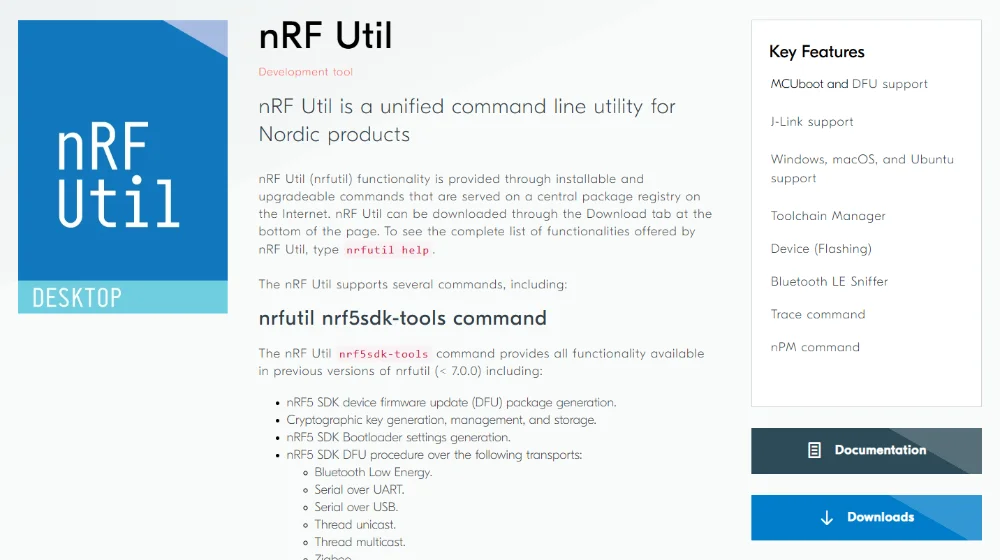
nRF Util (nrfutil) is a Python library and command line tool for programming and debugging Nordic Semiconductor MCUs.
Source Code
It doesn’t appear that the up-to-date source code of nRF Util is available. The older repo (pc-nrfutil) at https://github.com/NordicSemiconductor/pc-nrfutil was deprecated and marked as archived in Jan 2023.2
Installing Sub-Commands
By default, only a basic subset of the total available nRF Util commands are installed. You can install additional commands based on your specific needs via the nrfutil install command. You can use nrfutil search to search for installable commands.
For example:
nrfutil search 91Command Installed Latest Status91 0.5.0 Not installedThen to install the 91 command, run:
nrfutil install 91Device Sub-Commands
The nRF Util device sub-command can list, program, recover, erase, and do various operations on Nordic devices. It supports MCUboot and J-Link. Install device with:
nrfutil install deviceYou can list information about a device with nrfutil device device-info:
$ nrfutil device device-infoserial_number: 000960036306 boardVersion: PCA10090 deviceFamily: NRF91_FAMILY deviceVersion: NRF9151_xxAA_REV3 jlinkObFirmwareVersion: J-Link OB-K22-NordicSemi compiled Jul 8 2025 10:15:22 protectionStatus: NRFDL_PROTECTION_STATUS_NONEThis lists things such as the MCU device family (and version, which is like the family, but more specific) and the protection status.
Device recovery can be performed with:
nrfutil device recover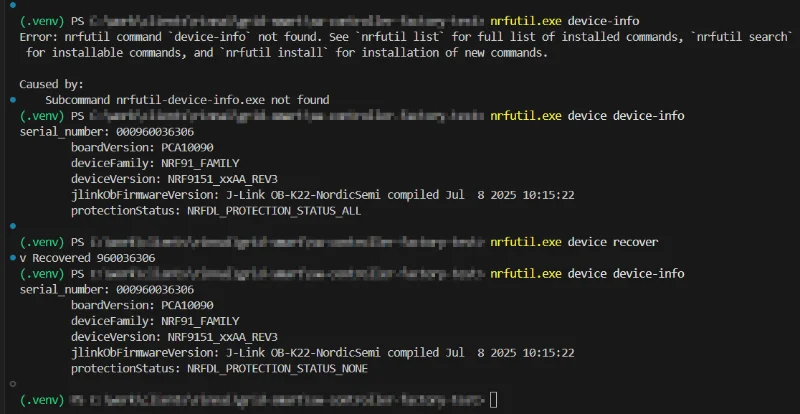
nrfutil device recover can be successfully run on an already recovered device. Once recovered, you should be able to verify it worked by running nrfutil device device-info and checking that the protection status is NRFDL_PROTECTION_STATUS_NONE.
You can reset the MCU by running nrfutil device reset. This command supports a --reset-kind flag which specifies what kind of reset to perform. The following values are supported:
RESET_DEFAULT: Selects a predefined reset kind based on the device family. For nRF54H and nRF92 this isRESET_HARD, for all others it isRESET_SYSTEM.RESET_SYSTEM: Trigger an ARM system reset by setting theSYSRESETREQbit in theAIRCRregister of the CPU. On devices with the Secure Domain firmware (SecDom FW), this is supported only on the secure core.RESET_HARD: Trigger a hard reset over the CTRL-AP. This is supported only for devices with the CTRL-AP implementation that has this functionality.RESET_SOFT: Trigger a soft reset over the CTRL-AP. This is supported only for devices with the CTRL-AP implementation that has this functionality.RESET_DEBUG(deprecated): Alias forRESET_SOFT. This option is deprecated and will be removed in a future version.RESET_PIN: Trigger a pin reset by toggling the reset pin.RESET_VIA_SECDOM: Send a reset command over ADAC to the SecDom FW. The SecDom FW handles the reset of other domains and defines how this process is carried out. The SecDom is not reset as part of this process. This option is supported on devices with the SecDom FW.
Devices can be programmed with the nrfutil device program command:
nrfutil device program --firmware <my_firmware_file>The SWD clock speed can be specified with the --swd-clock-frequency option (in kHz). In my scenario the clock speed was apparently already at the maximum allowed of 2 MHz. Trying to set it higher (e.g. 5 MHz) resulted in an error.
nrfutil.exe device program --firmware C:\mfw_nrf91x1_2.0.2.zip --swd-clock-frequency 5000[00:00:00] ------ 0% [1/3 960036306] Failed, SWD clock speed exceeds maximum of 2000 kHzError: One or more program tasks failed: * 960036306: SWD clock speed exceeds maximum of 2000 kHz (Generic)Setting it as --swd-clock-frequency 2000 worked, but the programming was not any faster than it was by default (approx. 30s to program the modem firmware).
pynrfjprog
pynrfjprog is a Python wrapper around the Nordic Semiconductor nrfjprog DLL (dynamic link library). The code is open source and available on GitHub.
Installation
To install pynrfjprog, into your Python environment, run the following command:
pip install pynrfjprogAs always, it is recommended to use a virtual environment to manage your Python packages.
Usage
Use enum_emu_snr() to enumerate the serial numbers of the connected programmers:
from pynrfjprog import LowLevel
with LowLevel.API('NRF52') as api:    serial_numbers = api.enum_emu_snr()    if serial_numbers is None:        print("No programmers found")    else:        print(f"Found {len(serial_numbers)} programmers with serial numbers: {serial_numbers}")
enum_emu_snr() returns a list of serial numbers (e.g. [960095105, 1051285627]). If no programmers are found, it returns None.
Footnotes
-
Nordic Semiconductor. nRF Util [website]. Retrieved 2025-05-15, from https://www.nordicsemi.com/Products/Development-tools/nRF-Util. ↩
-
Nordic Semiconductor. pc-nrfutil [GitHub repository]. Retrieved 2025-05-15, from https://github.com/NordicSemiconductor/pc-nrfutil. ↩