
Skip to content
Published On:
Jan 3, 2015
Last Updated:
Jun 25, 2026
The Bluetooth icon/logo.

Bluetooth is a collection of short range wireless communication protocols. The Bluetooth Special Interest Group (SIG) was founded in 1998 and oversees the development of Bluetooth standards.1 The original Bluetooth is known as Bluetooth Classic and was designed as a short-range wireless point-to-point communications protocol.

Child Pages

Piconet And Scatternets

A Piconet is the term used for a small Bluetooth network with 1 master device connected to up to 7 active slave devices. Up to 255 more slave devices may be connected to the master but in an inactive or “parked” state. Active slaves can be parked to bring parked devices into the active state.3

Both active and parked slaves in a Piconet are time-synchronized to the master so that RF contention does not occur (they implement a Time Division Multiple Access (TDMA) network).

A Scatternet is two or more independent Piconets which are connected together by one node in one Piconet (either the master or a slave) also acting as a slave in the second Piconet.4

Advanced Audio Distribution Profile (A2DP)

This is a bluetooth standard which supports the streaming of audio between bluetooth-enabled devices.

Bluetooth 4.0

In 2010, the Bluetooth Core Specification version 4.0 was released. This included Bluetooth Low Energy (BLE), which is now more commonly known as Bluetooth Smart. Bluetooth Smart specifies a hub-and-spoke connection model (with broadcast support), but no mesh topology.

An attribute is a piece of labelled and addressable data. A characteristic is a group of attributes, and a service is a group of characteristics.

attribute < characteristic < service

Bluetooth 4.0 uses the server/client paradigm.

L2CAP

L2CAP (Logical Link Control and Adaptation Protocol) is a protocol that provides connection-orientated and connectionless data services to the upper layer protocols. It sits above the HCI layer. It includes features such as multiplexing and data segmentation and reassembly (breaking data into smaller chunks and reassembling them at the other end).5 It is used by both Bluetooth Classic and Bluetooth Low Energy (BLE).

An L2CAP frame always contains a 4-byte header containing a 2-byte length and a 2-byte channel ID.6

Bluetooth Low Energy (BLE)

Bluetooth Low Energy (BLE) is a Bluetooth protocol specifically designed for communication on low power devices that need to run for months or years of small batteries. Active BLE connections can be maintained by a MCU with approx. 4–20uA of average current (depends on a lot of things, including connections settings and transmission power).

Channels

BLE has 40 channels, compared to Bluetooth Classic which has 79.7

Packet Structure

Every BLE packet, whether it carries an advertisement or connection data, uses the same link-layer format on air: a preamble, an access address, the PDU (the actual payload), and a CRC.8

The on-air structure of a BLE (uncoded PHY) packet. The PDU is the part that carries the payload; its header holds the PDU Type field that identifies the packet as an ADV_IND, SCAN_REQ, and so on.
  • Preamble (1 byte): A fixed, alternating bit pattern (0xAA or 0x55) the receiver uses for automatic gain control and bit-timing synchronisation. It is 2 bytes on the LE 2M PHY.
  • Access Address (4 bytes): Identifies the packet’s logical link. All advertising packets share the same fixed access address 0x8E89BED6; each connection is assigned its own randomly-generated access address when it is set up, so connected devices ignore packets that aren’t theirs.
  • PDU (Protocol Data Unit, 2–257 bytes): The payload — a 2-byte header plus 0–255 bytes of data. The header’s PDU Type field is what makes a packet an ADV_IND, SCAN_REQ, etc. (see the Advertising section for the common PDU types). Legacy advertising payloads are at most 37 bytes; the LE Data Length Extension allows larger PDUs on a connection.
  • CRC (3 bytes): A 24-bit cyclic redundancy check computed over the PDU, for error detection. The generator polynomial is x24+x10+x9+x6+x4+x3+x+1x^{24} + x^{10} + x^9 + x^6 + x^4 + x^3 + x + 1 (0x65B).8 It is seeded with a fixed 0x555555 for advertising packets, and with a random per-connection value (sent in the CONNECT_IND) for data packets. See the CRCs (cyclic redundancy checks) page for more on how CRCs work.

Before a packet is transmitted, its PDU and CRC are whitened (also called data randomisation or scrambling). The combined PDU + CRC bitstream is XORed with the output of a 7-bit linear-feedback shift register using the polynomial x7+x4+1x^7 + x^4 + 1, seeded from the channel index the packet is sent on. This breaks up long runs of identical bits, which would otherwise create a DC bias and make the receiver’s clock recovery and automatic gain control harder. The preamble and access address are deliberately left un-whitened so they stay recognisable for synchronisation. The receiver applies the identical LFSR to recover the original data. Note that whitening is purely for signal integrity — it is not encryption and provides no security.8

On the LE Coded PHY the packet additionally carries coding-indicator and terminator fields used by the forward error correction.

UUIDs

UUIDs are 128-bit (16 byte) numbers which are used to identify BLE services and characteristics. To avoid sending 16 bytes over the air all the time, the BLE specification defines a UUID base that forms the first 12 bytes of the UUID, leaving 4 bytes remaining to be specified by the application.

The base is:7

XXXXXXXX-0000-1000-8000-00805F9B34FB

The top 32 bits (4 bytes) of the UUID is then decided by the application. Most designs take this further and only specify a 16-bit UUID. In that case, the bottom 16 bits remain 0. This is supported by the BLE spec. For example, if we defined a 16-bit service UUID of 0x1234, this would represent the following 128 bit UUID:

00001234-0000-1000-8000-00805F9B34FB

Advertising

Advertising is when a BLE peripheral broadcasts packets to any device that wants to listen. Advertising allows a low energy device to sleep most of the time, only waking up periodically for a short amount of time to send a new advertisement packet. Advertising is unidirectional, the peripheral sends out unsolicited data and expects no response. To achieve 2-way communication you have to connect with the BLE peripheral.

Legacy advertising uses three channels from the 2.4GHz radio band, channels 37, 38 and 39. Extended advertising was added in Bluetooth 5.0 and uses all 40 Bluetooth LE channels, resulting in fewer collisions.9 Each sent advertisement adds a random 0–10 ms delay to avoid persistent collisions.

Advertisement packets give you 31 bytes of data for application specific use.

When a phone or other connecting device sees advertisement packets from a BLE peripheral, it can request more information with a scan request. The phone sends the device a scan request packet, then the device responds with a scan response packet. Both Android and iPhone devices automatically emit a scan request packet when they discover a new device as part of the Bluetooth scanning process.7

The timeline below shows this in action: a Peripheral advertising with ADV_IND packets across the three advertising channels each interval, a Central scanning it (SCAN_REQ/SCAN_RSP), and finally a Central establishing a connection with a CONNECT_IND.

A BLE advertising and scanning timeline. The Peripheral broadcasts ADV_IND advertisements on each of the three advertising channels (37, 38 and 39) once per advertising interval, switching to receive after each one to listen for a response. A scanning Central can reply with a SCAN_REQ (answered by a SCAN_RSP), or with a CONNECT_IND to start a connection.

The named items above (ADV_IND, SCAN_REQ, and so on) are PDU (Protocol Data Unit) types, not strictly “packets” (although they are often called as such, and normally the distinction does not matter). Strictly, the PDU is the payload of the packet structure described above, and its header carries a PDU Type field (this is the field Wireshark labels “PDU Type”). The suffixes follow the usual telecom naming convention: _REQ is a request, _RSP is a response, and _IND is an indication (an unsolicited broadcast that isn’t a reply to anything). The table below summarises the common advertising physical channel PDU types.

PDU TypeLegacy / ExtendedSent byDescription
ADV_INDLegacyPeripheralConnectable, scannable, undirected advertising. The general-purpose advertisement, any device may scan it for more data or connect to it.
ADV_DIRECT_INDLegacyPeripheralConnectable, directed advertising aimed at one specific, already-known Central. Used for fast reconnection; carries no advertising data.
ADV_NONCONN_INDLegacyPeripheralNon-connectable, non-scannable undirected advertising. A one-way broadcast (e.g. beacons) that can be neither connected to nor scanned.
ADV_SCAN_INDLegacyPeripheralScannable but non-connectable undirected advertising. Can’t be connected to, but a scanner can request extra data with a SCAN_REQ.
SCAN_REQLegacyCentralSent by a scanner (during active scanning) to ask an advertiser for additional data.
SCAN_RSPLegacyPeripheralThe advertiser’s reply to a SCAN_REQ, carrying a further 31 bytes of advertising data.
CONNECT_INDLegacyCentralSent by an initiator to establish a connection with the advertiser, carrying the connection parameters. Named CONNECT_REQ before Core Spec 5.0.
ADV_EXT_INDExtendedPeripheralExtended advertising (Bluetooth 5.0). A small PDU on the primary channels (37/38/39) that points to an AUX_ADV_IND on a secondary (data) channel, where the real payload lives.
AUX_ADV_INDExtendedPeripheralCarries the extended advertising payload on a secondary channel. Referenced by an ADV_EXT_IND, and (for periodic advertising) holds the SyncInfo pointing to the periodic train.
AUX_SCAN_REQExtendedCentralScan request sent on a secondary channel. The extended-advertising equivalent of SCAN_REQ.
AUX_SCAN_RSPExtendedPeripheralThe advertiser’s scan response on a secondary channel, replying to an AUX_SCAN_REQ.
AUX_CONNECT_REQExtendedCentralConnection request sent on a secondary channel to connect to an extended advertiser. The extended-advertising equivalent of CONNECT_IND.
AUX_CONNECT_RSPExtendedPeripheralThe advertiser’s acknowledgement of an AUX_CONNECT_REQ, confirming the connection on a secondary channel. This PDU is new to extended advertising and has no legacy equivalent.
AUX_SYNC_INDExtendedPeripheralA periodic advertising PDU, sent at the fixed periodic interval on the data channels and carrying the periodic advertising data.
AUX_SYNC_SUBEVENT_INDExtendedPeripheralA Periodic Advertising with Responses (PAwR, Bluetooth 5.4) PDU. Carries the data for one subevent of a PAwR train and opens the response slots in which synced devices may reply.
AUX_SYNC_SUBEVENT_RSPExtendedCentralThe reply a synced device sends back in a PAwR subevent’s response slot.This is what makes periodic advertising bidirectional (e.g. for Electronic Shelf Labels).
AUX_CHAIN_INDExtendedPeripheralA continuation PDU that chains additional advertising data when it doesn’t fit in a single packet.

Below is a table of the most popular “common data types”. These are defined in Bluetooth SIG - Assigned Numbers - Section 2.3 - Common Data Types.10

AD TypeIDDescription
Flags0x01A single-octet bit-field indicating discoverability (LE Limited / LE General Discoverable Mode) and BR/EDR support (e.g. BR/EDR Not Supported). Required when the advertisement is connectable.
Incomplete List of 16-bit Service UUIDs0x02Some, but not all, of the 16-bit (SIG-assigned) Service UUIDs supported by the device.
Complete List of 16-bit Service UUIDs0x03Every 16-bit (SIG-assigned) Service UUID supported by the device.
Incomplete List of 32-bit Service UUIDs0x04Some, but not all, of the 32-bit Service UUIDs supported by the device. 32-bit UUIDs are rarely seen in practice.
Complete List of 32-bit Service UUIDs0x05Every 32-bit Service UUID supported by the device.
Incomplete List of 128-bit Service UUIDs0x06Some, but not all, of the 128-bit (custom) Service UUIDs supported by the device.
Complete List of 128-bit Service UUIDs0x07Every 128-bit (custom) Service UUID supported by the device. Used when the device exposes vendor-defined services that don’t have a 16-bit SIG-assigned UUID.
Shortened Local Name0x08

A shortened version of the complete local name. A shortened name should only contain contiguous characters from the start of the full name.11

Complete Local Name0x09The human readable name of the device. A user would typically see this name when scanning for devices on their mobile phone.
TX Power Level0x0AThe transmitted power level of the advertising packet, encoded as a signed 8-bit value in dBm. Lets a scanner estimate path loss (and therefore approximate distance) by comparing this value to the measured RSSI.
Service Data — 16-bit UUID0x16A 16-bit Service UUID followed by arbitrary service-specific data bytes. Commonly used by beacon formats like Eddystone, and by SIG-assigned services such as the Battery Service to broadcast a state of charge.
Appearance0x19A 16-bit enumerated value describing the external appearance / device category (e.g. generic phone, heart rate sensor, computer mouse). Lets the central pick an appropriate icon before connecting.
Manufacturer Specific Data0xFFA 16-bit company identifier followed by arbitrary vendor-defined bytes. Used heavily in practice — Apple iBeacon, Microsoft Swift Pair and most proprietary advertising payloads live here.

Advertising Encoder/Decoder

Below is an interactive BLE advertising packet decoder/builder. Paste a raw payload hex string to see the AD structures broken out, or build one up using the structure editor on the right — the two views stay in sync.

Hex payload

18 / 31 bytes used

Structures

Flags0x01
02 01 06
LE General Discoverable Mode, BR/EDR Not Supported
Complete Local Name0x09
Name:
0E 09 6D 62 65 64 64 65 64 2E 6E 69 6E 6A 61
"mbedded.ninja"

Connections

A BLE connection is an ongoing, bi-directional data link established between a Central (e.g. PC or phone) and Peripheral device (e.g. electronics sensor or smart watch). Unlike advertising, which is a one-way broadcast on the advertising channels (37, 38, and 39), a connection carries data in both directions. The Central initiates the connection by responding to a Peripheral’s connectable advertisement. Once connected, the two devices hop together across the 37 data channels using adaptive frequency hopping. They exchange data in periodic bursts called connection events. Both sides can sleep between connection events, which is one of the reasons BLE is so power efficient. The exchanges are time-synchronized so they know exactly when to wake up in the exchange windows.

During each connection event the Central transmits first and the Peripheral replies one T_IFS (150 µs) later. The start of an event is called the anchor point, and consecutive anchor points are spaced one connection interval apart. If neither side has data, they still exchange short “keep-alive” packets each event; if a side has more to send, it sets the More Data (MD) bit and the two keep exchanging packets within the same event.

BLE connection events. The Central transmits at each anchor point and the Peripheral replies one T_IFS (150 µs) later. When neither side has data, empty packets are exchanged to keep the connection alive (which also resets each side’s supervision timer). With a slave latency of 1 the Peripheral may skip a connection event entirely, and multiple packets can be sent each way within a single event while the More Data (MD) bit is set.

Connection Parameters

Bluetooth BLE has the following modifiable connection parameters:12

Connection interval

This is the interval between connection attempts in milliseconds. It must be in the range 7.5ms to 4s.13 It is typically specified in units of 1.25ms. The Peripheral can actually request two parameters, a connection interval min and connection interval max. The Central device then uses this info to choose what is actually used (more on this below).

Slave latency

This specifies the number of connection intervals the peripheral can skip when it has no data to send.13 This must be in the range of 0–499 intervals. The Central device must still poll the peripheral on every connection interval. This has a similar power saving effect on the Peripheral side as increasing the connection interval, except with the added benefit that fast connection intervals can be used when the Peripheral has data to send. For example, if the connection interval is 30 ms and the slave latency is 4, the slave just needs to wake up every 4 + 1 = 5th connection attempts (150 ms) to respond to Central.

Connection supervision timeout

This determines how long each side waits since the last valid packet before assuming the connection is lost. This is to drop connections due to non-planned for events, e.g. if devices go out-of-range, get too much interference, or run out of battery. This is specified in milliseconds and must be in the range of 100 ms to 32000 ms (32.0 s) and must be in intervals of 10 ms. The connection supervision timeout must also obey the following additional constraint:12

  • Core Spec 4.0 / 4.1: connSupervisionTimeout > (1 + connSlaveLatency) * connInterval
  • Core Spec 4.2+: connSupervisionTimeout > (1 + connSlaveLatency) * connInterval * 2

Why the addition of the * 2 in Core Spec 4.2+? My guess is that prior to Core Spec 4.2+, the connection supervision timeout was allowed to be set to something just over the bare minimum of what is essentially one effective response interval if the Peripheral didn’t have anything to send (the Peripheral had to legally respond every (1 + connSlaveLatency) connection intervals). One missed connection event, e.g. a corrupted packet or RF interference could then cause the timeout and the connection to be dropped. Adding in the * 2 gives another full effective communication interval as a buffer against this issue.

Both Central and Peripheral monitor the link and start a timer once the connection is established. Each time a valid packet is received, the timer is reset. If the timer expires, the connection is considered lost. At this point nothing is sent over the link. The controller then raises an HCI Disconnection Complete event to its host with reason code 0x08 — “Connection Timeout”.

This timeout is different to the fixed 6-connection-event establishment timeout that is used when making the connection. Also note that this differs from a graceful disconnect (when one side intentionally ends the connection). In a graceful disconnect, the node sends an LL_TERMINATE_IND control PDU over the air (a packet is actually transmitted over the air) and the peer learns this immediately.

Note that these are the constraints set by the BLE standard. Operating systems can and normally do impose additional constraints on these parameters, more on this below.

These connection settings are controlled by the Central device. However, the Peripheral can suggest connection parameters to the Central device. The Central device can choose to accept or reject them (or use different parameters). This is the reason a min. and a max. are given for the connection interval, it allows the peripheral to suggest a range and gives the Central device some flexibility in choosing the connection parameters.

See the Zephyr page for information on how to set these connection parameters on MCUs running the Zephyr RTOS.

Once connected, the Central can discover the Peripheral’s GATT services and characteristics. It can then read, write or subscribe to notifications on them. The application layer uses these services and characteristics to exchange data.

Setting Connection Parameters from a Central App

A subtle but important point for application developers: even though the connection parameters are set by the Central, an app running as Central usually has surprisingly little direct control over them. The normal model is that the Peripheral requests its desired parameters by sending an L2CAP Connection Parameter Update Request (or, on Bluetooth 4.1+, an equivalent Link Layer connection parameter request), and the operating system running the Central (not the app) then accepts or rejects them. What an app developer can actually set, and the ranges allowed, varies significantly by platform:

  • iOS and macOS (CoreBluetooth): There is no public API for a Central app to set or request the connection interval, peripheral latency or supervision timeout, the Peripheral must request them. iOS/macOS then enforce Apple’s rules from the Accessory Design Guidelines, and a request is rejected unless it satisfies all of the following:14 15

    • Connection interval min ≥ 15 ms, and a multiple of 15 ms.
    • Interval min + 15 ms ≤ interval max (unless both equal 15 ms).
    • Peripheral latency ≤ 30.
    • Supervision timeout between 2 s and 6 s.
    • Interval max × (peripheral latency + 1) ≤ 2 s.
    • Interval max × (peripheral latency + 1) × 3 < supervision timeout.

    So the effective minimum connection interval on Apple devices is 15 ms (not the 7.5 ms spec minimum), and some devices will scale a requested 15 ms up to 30 ms. The one exception is a connection that includes the BLE HID service, where an interval down to 11.25 ms is allowed.

  • Android (Central app): An app cannot set raw parameter values. Its only lever is BluetoothGatt.requestConnectionPriority(), which takes one of a few preset priorities.16 The AOSP (Android Open Source Project) default intervals each priority maps to are:17

    • CONNECTION_PRIORITY_HIGH: 11.25–15 ms, peripheral latency 0.
    • CONNECTION_PRIORITY_BALANCED (the default): 30–50 ms, peripheral latency 0.
    • CONNECTION_PRIORITY_LOW_POWER: 100–125 ms, peripheral latency 2.

    (A CONNECTION_PRIORITY_DCK mode also exists, for digital car keys.) The supervision timeout is fixed by the stack (around 20 s) regardless of priority. Note that these are AOSP defaults and a phone manufacturer can override them via a resource overlay.

  • Windows (WinRT): Before Windows 10 version 2004 (build 19041), apps had no control and Windows chose the parameters automatically. Since then, the BluetoothLEPreferredConnectionParameters API lets an app pick one of three presets — ThroughputOptimized, PowerOptimized or Balanced — and apply it via BluetoothLEDevice.RequestPreferredConnectionParameters().18 There is no way to specify arbitrary custom values, and Microsoft does not publish the exact interval/latency/timeout numbers behind each preset.

  • Linux (BlueZ): The parameters used when the adapter initiates a connection come from adapter-wide defaults in debugfs (which require root to change): conn_min_interval, conn_max_interval, conn_latency and supervision_timeout under /sys/kernel/debug/bluetooth/hci0/. The kernel defaults are 30 ms, 50 ms, 0 and 420 ms respectively.19 BlueZ honours a Peripheral-initiated update request while acting as Central, with the Central retaining the final say.

So taking into account all of this, if you need specific connection timing (e.g. low latency or low power), the most portable place to drive it is the Peripheral’s firmware which can request appropriate parameters. On iOS in particular that is the only way to influence them.

Security: Pairing, Bonding and LE Secure Connections

BLE security is established through pairing. This is the process where two devices exchange their security capabilities and generate the keys used to encrypt and authenticate the link. Pairing happens in three phases:20

  1. Feature exchange: The two devices swap their security requirements and I/O capabilities (whether they have a display, a keyboard, yes/no buttons, etc.) via a Pairing Request / Pairing Response. This is what determines which association model (see below) is used.
  2. Key generation / authentication: The devices authenticate each other and generate a shared key. This is the phase that differs between LE Legacy Pairing and LE Secure Connections.
  3. Key distribution: The devices distribute and store additional keys (e.g. the keys needed to resolve a private resolvable address) so the link can be re-established and re-encrypted in future without pairing again. Storing the keys for later reuse like this is called bonding.

LE Legacy Pairing vs. LE Secure Connections (LESC)

There are two methods for the key generation phase, and which one is used depends on what both devices support:

  • LE Legacy Pairing (Bluetooth 4.0–4.1): A Short-Term Key (STK) is derived from a Temporary Key (TK), where the TK is 0 (for Just Works), a 6-digit passkey, or out-of-band data. The key agreement is weak — a passive eavesdropper who captures the pairing exchange over the air can recover the keys and decrypt all subsequent traffic (the open-source tool Crackle famously demonstrated this).21 Legacy pairing therefore offers no protection against passive eavesdropping.
  • LE Secure Connections (LESC) (Bluetooth 4.2+): Introduced in 2014, LESC uses Elliptic-Curve Diffie–Hellman (ECDH) key agreement on the NIST P-256 curve, with FIPS-approved algorithms (AES-CMAC and P-256).20 The two devices exchange ECDH public keys over the air and each independently computes a shared secret, from which the Long-Term Key (LTK) is derived. Crucially, an attacker who captures the entire over-the-air exchange still cannot compute the shared secret, so LESC defeats passive eavesdropping even when the “Just Works” model is used.

Both devices must support LESC for it to be used; if either side only supports legacy pairing, the connection falls back to LE Legacy Pairing. For this reason, security-conscious designs can refuse to bond unless LESC is negotiated.

Association Models

The association model (the specific method used to authenticate the pairing) is selected automatically from the two devices’ I/O capabilities and their man-in-the-middle (MITM) protection requirements. There are four:22

  • Just Works: No user interaction. Provides an encrypted link but no MITM protection (although under LESC it still resists passive eavesdropping). Used when at least one device lacks a display and input.
  • Passkey Entry: A 6-digit passkey is displayed on one device and entered on the other (or pre-shared). Provides MITM protection.
  • Numeric Comparison: New to LESC (not available in legacy pairing). Both devices independently compute and display a 6-digit value, and the user confirms they match with a simple yes/no.22 This gives MITM protection while only requiring yes/no buttons rather than a full numeric keypad.
  • Out Of Band (OOB): The pairing data is exchanged over a separate channel (e.g. NFC). The level of MITM protection depends on the security of that OOB channel.

Beacons

Beacons are BLE peripherals that use advertisement exclusively, and do not allow for connections. This is so that the device can always be found and used, if a connection occurs then the peripheral is meant to stop advertising.7

Apple’s iBeacon is the most popular beacon standard.

LE Coded PHY

Bluetooth Low Energy was originally designed to reduce power consumption but offer the same transmission distances as standard Bluetooth (Bluetooth Classic). This is typically around 10–100 m range in normal operation conditions (inside a building), and about 50–300 m line of sight in optimal conditions. LE Coded PHY (a.k.a. Bluetooth long-range mode) was introduced in Bluetooth 5.0 to extend the range of Bluetooth Low Energy devices to approximately 4x the range of the 1M PHY.23

Support for LE Coded PHY is optional, and is not supported by all devices.23

With the addition of LE Coded PHY, there are now 3 PHYs available for BLE:

  • LE 1M PHY: 1 Megasymbols per second. The original BLE PHY introduced in Bluetooth v4.0.
  • LE 2M PHY: 2 Megasymbols per second. Introduced in Bluetooth 5.0, doubles the speed of the 1M PHY (approx.). Range is reduced to about 80% of the 1M PHY.24 The faster transmission speed was somewhat motivated by the desire to support firmware OTA updates.9
  • LE Coded PHY: 1 Megasymbols per second, but with multiple symbols per bit. Introduced in Bluetooth 5.0, extends the range of Bluetooth Low Energy devices to 1km line of sight.

For the LE Coded PHY, data is still sent at 1 Megasymbols per second like in 1M PHY. The key difference is that it uses forward error correction (FEC), and multiple symbols are sent per bit, which increases transmission distance at the expense of slower data rates. This redundant information allows the receiver to detect and correct errors in the received data. There are two configurations for LE Coded PHY:

  • S2: 2 symbols per bit in the payload. Gives a data rate of 500 kbps.
  • S8: 8 symbols per bit in the payload. Gives a data rate of 125 kbps.

8 symbols per bit (S8) is always used for the access header, irrespective of the configuration for the payload.

In many applications, slowing down the transmission speed for increased range is a good trade-off. One downside to consider is the increased power usage. Power usage is approximately proportional to the radio on time, and you’ll spend approx. 8 times longer (this ignores things like start-up time) to send a packet with the LE Coded PHY S8 configuration than the standard 1M PHY. Thus 8 times more power is used.

Smartphone Support

LE Coded PHY support is optional, and as of August 2025 support on smartphones is somewhat common (support is getting better and better as time goes on).23

Information on the internet reports the following phones support LE Coded PHY:

  • Google Pixel 4 (but device needs to advertise on LE 1M to be found first, so useless for long range applications!)26
  • OnePlus 7 and above26
  • Samsung Galaxy A826
  • Samsung Galaxy Tab A726
  • Samsung S10+26
  • Samsung S2026
  • Xiaomi Poco X326

Periodic Advertising

Periodic advertising was added in Bluetooth 5.0 to allow for a low-power, connectionless one-to-many communication architecture. It is a connectionless broadcast mode where an advertiser sends advertising packets at a fixed, deterministic interval that scanners can synchronise to. This means the scanners knows exactly when and on what channel the next packet will arrive, and can keep it’s radio off for the rest of the time. It is purely unidirectional (no responses).27

Standard advertising (even when extended) is deliberately non-deterministic, as each advertising event adds a random delay (advDelay) of 0–10 ms to avoid persistent collisions. This is fine for discovery, but to catch repeated advertisements the receiver has to scan continuously, which is power hungry, and there is no way to broadcast to multiple listeners.

How It Works

  1. The advertiser sends ADV_EXT_IND (legacy advertisements) on the primary advertising channels (37, 38 and 39), which points to an AUX_ADV_IND (extended advertisements) on a data channel.27
  2. The AUX_ADV_IND contains a SyncInfo field which contains the timing and channel-hopping parameters of the periodic advertisements. The AUX_ADV_IND is part of extended advertising, so extended advertising is normally enabled by default when using periodic advertising.
  3. The actual periodic data is in AUX_SYNC_IND packets that are sent of the data channels at the fixed periodic advertising interval.
  4. A receiver uses the SyncInfo field to work out the sync parameters, then just listens at the scheduled anchor points for the AUX_SYNC_IND packets.

The periodic advertising interval is specified in units of 1.25 ms, ranging from 7.5 ms up to about 81.92 s.

Advertisers periodically send new AUX_ADV_IND packets so that new scanners can synchronise to the data stream or existing scanners can resume a lost sync.27

Periodic Advertising Sync Transfer

Bluetooth 5.1 advanced the periodic advertising of 5.0 with the addition of periodic advertising sync transfer (PAST). The is where one device and pass sync info to another so it doesn’t have to find it itself with a scan.28

LE Audio / Auracast Broadcast Audio

Bluetooth 5.2 added LE audio / Auracast Broadcast Audio with Broadcast Isochronous Streams so that many receivers can sync to the same audio broadcast. This allows applications such as sharing TV audio with friends/family and tuning into specific broadcasts in public spaces.29

Android 16 added Auracast support to the OS.29 Android TV 14 added support so that TVs can broadcast audio to multiple receivers.

Periodic Advertising with Responses

Periodic Advertising with Responses (PAwR) was added in Bluetooth 5.4. This is where response slots where added to periodic advertising, making them bi-directional.

This mode is designed to support hundreds to thousands of energy-constrained devices simultaneously. One popular use case is Electronic Shelf Labels (ESL).

Connection Subrating

Connection subrating was added in Bluetooth 5.3 to allow the peripheral to listen on only a subset of connection events (a subrate of the underlying connection interval).30 Connection subrating was introduced to solve the problem of latency when changing from slow to faster connection intervals. It takes at least six connection events (i.e. six connection intervals if slave latency = 0) to negotiate a new connection interval. If the connection interval was long (e.g. 1 second), and the peripheral wanted to update this to 10 ms, it would take at least 6 seconds to negotiate this change. This wait can be unacceptable in many applications.

Connection subrating works like this:

  1. You establish a connection for a short underlying connection interval (e.g. 10 ms).
  2. You agree to a subrate factor NN. The peripheral is only required to listen on every NNth connection event, called the subrating anchor points. Its wake-up interval becomes NconnIntervalN \cdot \text{connInterval}, allowing it to sleep for longer and save power.
  3. The moment any side has data, the link can immediately start communicating at the fast connection interval and run at the fast rate. The connection events between the anchor points are called the continuation events.

Shorter Connection Intervals (SCI)

Bluetooth Core 6.2 added Shorter Connection Intervals (SCI) to BLE. Standard BLE allows for a minimum connection interval of 7.5 ms (133Hz\approx 133\unit{Hz}).31 SCI allows for a much smaller minimum connection interval of 375 µs (2667Hz\approx 2667\unit{Hz}). One of the core motivations for this is to support high-speed, low-latency applications such as gaming controllers which are normally expected to run at 1000 Hz or faster. This will hopefully reduce the need for proprietary RF protocols and their custom dongles for gaming peripherals.32 Other applications might include VR/AR headsets and real-time industrial sensing.

Nordic Semiconductor (manufacturer of Bluetooth-capable MCUs) and Logitech (manufacturer of gaming peripherals) were both contributors to the SCI feature.32 31

SCI names the range from 375 µs to 4.0 seconds (with a resolution of 125 µs) the Extended ConnInterval Values (ECV). Two subset ranges are defined:33

  • Rounded ConnInterval Values (RCV): All values of the ECV (from 375 µs to 4.0 s) that are multiples of 1250 µs.
  • Baseline ConnInterval Values (BCV): All values of the RCV that are greater or equal to 7.5 ms (i.e. from 7.5 ms to 4.0 s with a resolution of 1250 µs).

If a Bluetooth controller supports SCI, it must support all values from the RCV. Optionally, it can also support any other values from the ECV. If the controller DOES NOT support SCI, it only needs to support the values from the BCV.33 When a connection is created, the connection interval must be in the BCV range. Once connected, the connection interval can be changed on either side with:

  • Peripheral: The peripheral uses a Connection Rate Request.
  • Central: Central uses a Connection Rate Indication.

A controller that supports SCI must also support connection subrating (which was introduced in Bluetooth 5.3).33 30 It should also support Frame Space Update (FSU) to optimise the time between adjacent transmissions.

The existing LL_CONNECTION_UPDATE_IND PDU was not flexible enough for SCI, so Bluetooth Core 6.2 introduces two new link-layer PDUs for connection rate negotiation:34

  • LL_CONNECTION_RATE_REQ: Sent by the Peripheral to request new timing parameters. This includes the acceptable interval range, subrate factors, slave latency, continuation number, timeout, preferred periodicity and up to four candidate anchor offsets.
  • LL_CONNECTION_RATE_IND: Sent by Central to confirm and apply the new timing parameters. This PDU contains the exact interval, window offset, and event count that the new parameters will take effect.

What is achievable in practice?

Although the spec. goes down to 375 µs connection intervals, in practice many devices cannot achieve this due to processing time, e.g. the time it takes to process the data in the Bluetooth stack. Nordic Semiconductor can achieve the following minimum connection intervals on its MCUs:34

PlatformMinimum Supported Connection Interval
nRF54L Series750 µs
nRF52, 53, 54H Series875 µs

LE Flushable ACL Data

With the advent of SCI, connection events (and data transfer) can happen at sub-millisecond intervals. Stale data can become a problem. Imagine a gaming mouse which is sending back position data, and some interference occurs which causes a few packets to back up in the “to send” queue. The oldest packets start to become irrelevant as new data is added to the queue. Bluetooth Core 6.2 adds a new feature called LE Flushable ACL Data which allows the host to mark certain data as “flushable” and provide a flush timeout. This means that if the data’s first transmission does not occur within the flush timeout, it can be dropped instead of being sent late.

Frame Space Update (FSU)

Bluetooth Core 6.0 made the frame space time between adjacent transmissions configurable. Before this, the frame space (T_IFS or inter-frame space) was fixed at 150 µs. This is the time between the end of one packet and the start of the next packet. This was fine when the minimum connection interval was 7.5 ms, but with SCI and sub-millisecond connection intervals, this fixed frame space can become a significant overhead. Frame space update allows the frame space to be negotiated to intervals less or greater than 150 us. The range is from a microseconds all the way up to 10 ms.7

Two new link-layer PDUs were added to support this:7 35

  • LL_FRAME_SPACE_REQ: Sent by a Controller to request a new frame space interval. Controller sends a minimum and maximum frame space value in microseconds. There is also a Spacing_Types bit-field which sets what types this value should apply to. Op code 0x3B.
  • LL_FRAME_SPACE_RSP: Sent by another Controller to confirm and apply the new frame space interval. Op code 0x3C.

Note that because the spec mentions Controller and not Central/Peripheral for the FSU, I can only assume that either role can request a frame space update, and the other role can accept or reject it.

Bluetooth Smart Mesh Working Group

In 2017, a set of three specifications were released by the Bluetooth SIG:

  • Mesh Profile
  • Mesh Model
  • Mesh Device Properties

These specifications allowed Bluetooth devices to form a mesh network. Mesh Profiles use Bluetooth LE for its underlying radio communications, and as such Mesh Profiles work with Bluetooth 4.2 and Bluetooth 5 devices.

Bluetooth Mesh data packets can be up to 384 bytes.

Packet Delivery

Packets are not routed in a Bluetooth mesh, but instead use flooding. Packets are not sent through a particular sequence of nodes to reach the destination, nor are routing tables kept by any of the nodes. Instead, nodes can be designated as relays which receive the message and re-broadcast it to everyone in range. Any relays receiving this will then re-broadcast it again, and so on. Nodes keep track of the packet ID so that they do not re-transmit a message they have already received and transmitted before. This method of flooding is intended to keep the network simple and resilient to node failure. If nodes acted as routers, their failure might have a significant impact on the network.36

Latencies

Bluetooth mesh latency depends on the payload size, number of nodes (incl. number of relays) and the connection topology. You can expect round-trip latencies of around 50ms for packets with an 8 byte payload that go through 3 hops.37 Silicon Labs has a great application note, AN1137: Bluetooth Mesh Network Performance which goes into mesh latencies in more detail.

Encryption

Two types of encryption keys:

  1. Network keys: Specific to a physical network.
  2. Application keys: Specific to the function of the data, e.g. reading sensor values vs. configuring the sensor.

Bridge ICs

CH9141/CH9143

The CH9141 is a serial-to-Bluetooth BLE bridge IC made by Nanjing Qinheng Microelectronics Co., Ltd. that allows for “transparent” serial communication over Bluetooth. It supports broadcast, host and slave mode.38 It looks like there are not many suppliers for this IC, and much of the information is not in English.
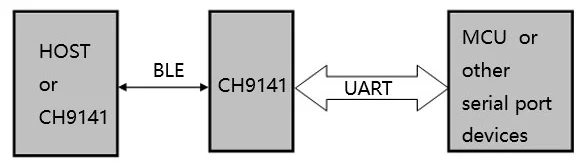
A typical application diagram from the CH9141 BLE bridge IC.38

Chipsets

Bluetooth chipsets are ICs that contain a Bluetooth transceiver and processor that are designed to be used in things such as Bluetooth USB dongles.

Broadcom BCM20702

The BCM20702 is a Bluetooth 4.0 processor made by Broadcom that is commonly found in Bluetooth USB dongles. Sometime on or before 2016, Cypress Semiconductor acquired the part number/IP and renamed it the CYW20702. There is not much information online about the original Broadcom BCM20702, but there is a datasheet for the Cypress part.

The block diagram below shows the internal architecture of the CYW20702 IC.
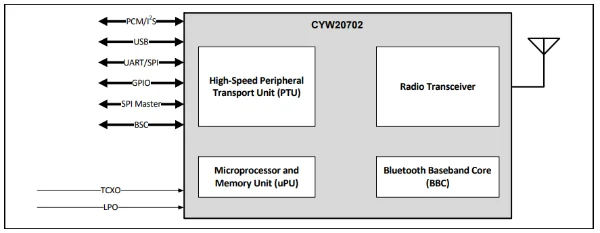
An internal block diagram of the CYW20702 Bluetooth transceiver and baseband processor.39

CSR8510

The CSR8510 is a Bluetooth 4.0 single-chip radio and baseband IC designed for PCs and other devices. It was originally designed by CSR (Cambridge Silicon Radio). CSR was acquired by Qualcomm in 2015.40 Qualcomm has kept the CSR part numbers. It appears the popular TP-Link UB400 Bluetooth dongle uses this chipset.41

Modules

HC-05/HC-06

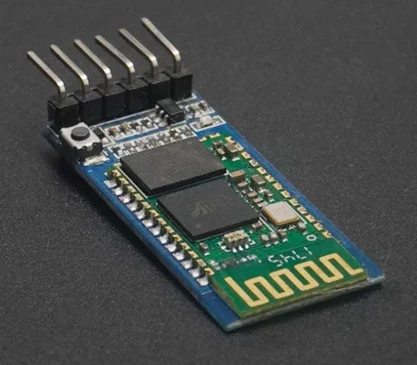
The HC-05 and HC-06 are Bluetooth modules that are popular in the hobbyist space (e.g. commonly used with Arduinos). The are serial to Bluetooth modules which use the Bluetooth Classic SPP over RFCOMM protocol. The HC-05 is based of the CSR BC417143 IC.42

A photo of the HC-05 Bluetooth module.43

Serial Ports over Bluetooth

Traditionally, Bluetooth provides specific ways of accessing data in the form of profiles. There are two primary ways to provide a “serial port” over Bluetooth:

  • SPP over RFCOMM on Bluetooth Classic: Bluetooth Classic defines an emulated serial port standard called the SPP (Serial Port Profile) which uses RFCOMM. It emulates not just a TX and RX serial stream, but also the flow control lines as defined by the RS-232 standard. See below for more details.
  • BLE: The BLE specification does not define a serial port standard, but there are many proprietary implementations available. See below for more details.

SPP over RFCOMM

Bluetooth Classic defines an emulated serial port standard called the SPP (Serial Port Profile) which uses RFCOMM. RFCOMM in turn uses L2CAP. It emulates not just a TX and RX serial data lines (as streams), but also the flow control lines.44 It has good support by many Bluetooth-enabled microcontrollers, dongles and operating systems.

Pin Circuit Name
102Signal Common
103Transmit Data (TD)
104Received Data (RD)
105Request to Send (RTS)
106Clear to Send (CTS)
107Data Set Ready (DSR)
108Data Terminal Ready (DTR)
109Data Carrier Detect (CD)
125Ring Indicator (RI)
RS-232 pin assignments for RFCOMM protocol implementation.

The screenshot below shows how Bluetooth devices that support SPP over RFCOMM can show up in Microsoft Windows. This screenshot was taken in NinjaTerm.
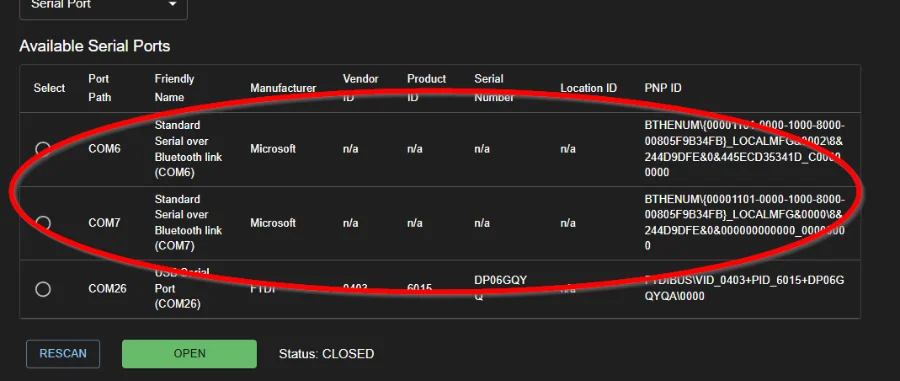
A screenshot of Microsoft “Standard Serial over Bluetooth link” ports in NinjaTerm.

The HC-05 and HC-06 Bluetooth modules which are popular in the hobbyist space use SPP over RFCOMM to implement the bi-directional data stream.

BLE Serial

Unfortunately, there is no standard specified by the Bluetooth SIG for implementing a virtual serial port over Bluetooth Low Energy (BLE). However, many vendors have implemented their own proprietary protocols for this, and a few of them have become somewhat “industry standard”. What this means is to pick a particular service UUID, and within that one characteristic UUID for TX data, and another characteristic UUID for RX data.

Hopefully, the device includes the service IDs in its advertisement packet. This way, a Bluetooth central device which is looking for serial capable peripherals can perform a Bluetooth scan and identify the compatible peripherals without having to connect to them.

One of the most popular implementations is the Nordic Semiconductor “Nordic UART Service” (NUS). The service and characteristic UUIDs are:45

  • Service UUID: 6e400001-b5a3-f393-e0a9-e50e24dcca9e (16-bit offset: 0x0001)
  • RX Characteristic UUID: 6e400002-b5a3-f393-e0a9-e50e24dcca9e (properties: “write”, “write without response”)
  • TX Characteristic UUID: 6e400003-b5a3-f393-e0a9-e50e24dcca9e (properties: “notify”)

The Microchip Transparent UART Service is a implementation by Microchip. It uses the following UUIDs:46

  • Service UUID: 49535343-fe7d-4ae5-8fa9-9fafd205e455
  • RX Characteristic UUID: 49535343-8841-43f4-a8d4-ecbe34729bb3 (properties: “write”, “write without response”)
  • TX Characteristic UUID: 49535343-1e4d-4bd9-ba61-23c647249616 (properties: “notify”, “write”, “write without response”)

Texas Instruments also has an implementation called the TI Serial Port Service (SPS). It uses the following UUIDs:47

  • Service UUID: f000c0e0-0451-4000-b000-000000000000
  • Data Characteristic UUID: f000c0e1-0451-4000-b000-000000000000 (properties: “notify”, “write”)
  • Status Characteristic UUID: f000c0e2-0451-4000-b000-000000000000
  • Config Characteristic UUID: f000c0e3-0451-4000-b000-000000000000

The TI SPS implementation is a little different from Nordics and Microchips in that there is a single data characteristic for both TX and RX data, and additional information is sent via the status and config characteristics. It is designed so that you can actually configure a real serial port (i.e. one needing settings like baud rate, parity, stop bits, etc.) on the BLE peripheral over BLE from a phone/computer (BLE central device). In this sense the peripheral can be considered a bridge.

The TI status characteristic provides the following information:47

  • Framing error count
  • Parity error count
  • RF link overrun
  • Number of RX bytes
  • Number of TX bytes

All of these data points are reset to 0 when the status characteristic is read.

u-blox has their own “u-connectXpress” Bluetooth serial port service which uses the following UUIDs:48

  • Service UUID: 2456e1b9-26e2-8f83-e744-f34f01e9d701
  • Data Characteristic (FIFO) UUID: 2456e1b9-26e2-8f83-e744-f34f01e9d703 (properties: “indicate”, “notify”, “write”, “write without response”)
  • Credits Characteristic UUID: 2456e1b9-26e2-8f83-e744-f34f01e9d704 (properties: “indicate”, “notify”, “write”, “write without response”)

Like TI, u-blox uses a single data characteristic for both TX and RX data. The credits characteristic is used for a form of flow control.

Silicon Labs also has their own implementation called “SPP over BLE”. It uses the following UUIDs:49

  • Service UUID: 4880c12c-fdcb-4077-8920-a450d7f9b907
  • Data Characteristic UUID: fec26ec4-6d71-4442-9f81-55bc21d658d6 (properties: “notify”, “write without response”)

Again, like TI, Silicon Labs uses a single data characteristic for both TX and RX data.

BLE v4 messages are limited to 20 bytes. BLE v5 was updated to allow for longer messages, but some software and devices listing themselves as v5 still impose the 20 byte limit.50

Libraries and Applications that use Bluetooth Serial

If you want to connect to this Bluetooth NUS shell peripheral from a computer, you can use the NinjaTerm terminal application. This supports Bluetooth LE as a connection type, and can auto-detect and listen to the popular Bluetooth serial service and characteristic UUIDs such as the Nordic UART Service (NUS).
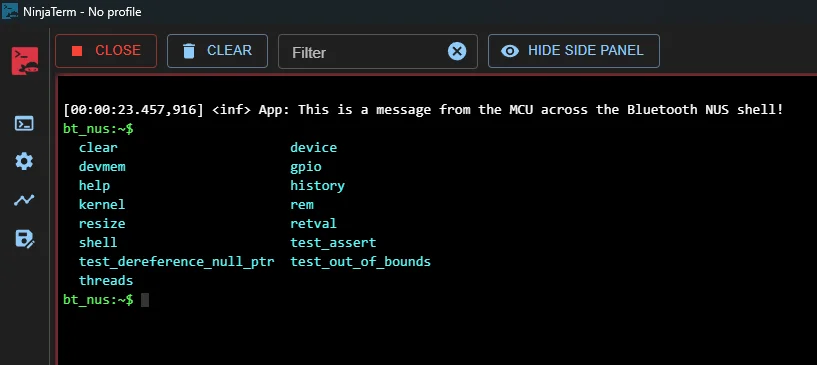
A screenshot of a log message and shell prompt sent across the Bluetooth NUS shell in NinjaTerm.

The Android app “Serial Bluetooth Terminal” by Kai Morich provides a terminal for your phone to communicate over Bluetooth serial.
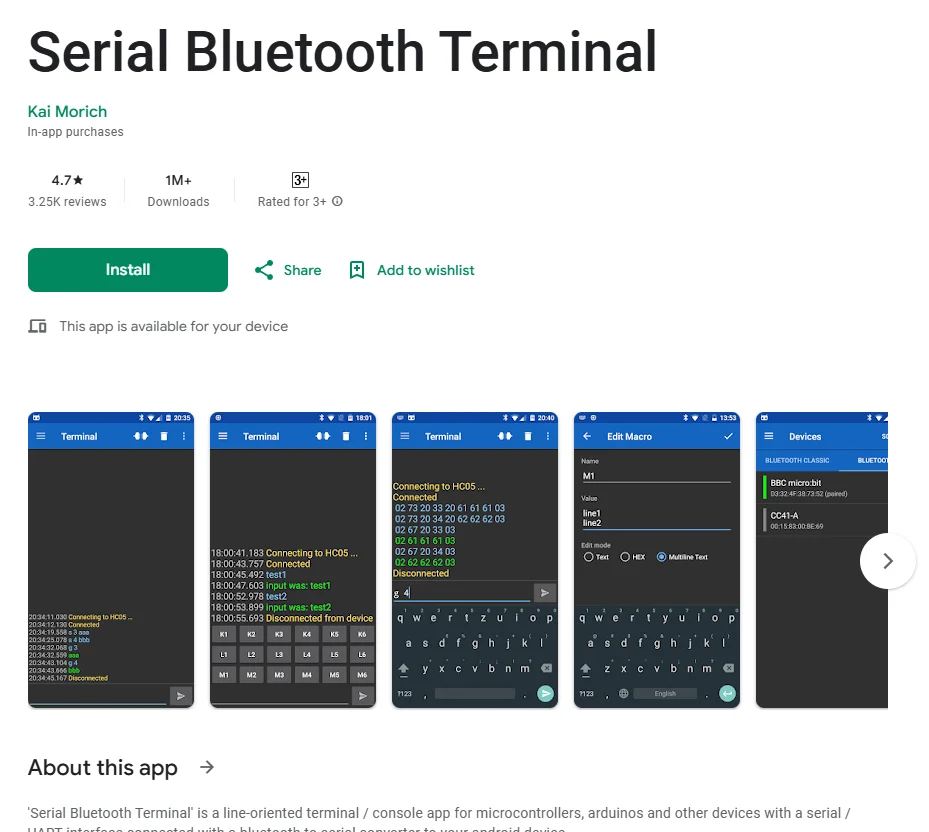
The Android app “Serial Bluetooth Terminal” available from the Google Play store.

The “Web-Bluetooth-Terminal” by loginov-rocks is a web app (PWA to be exact) that runs in your browser and provides a terminal that uses the Web Bluetooth API.
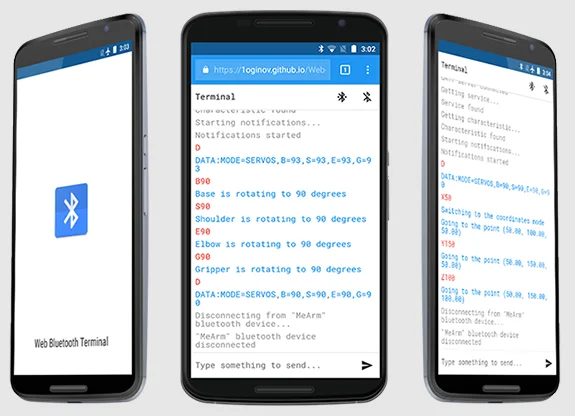
A image showing the loginov-rocks “Web-Bluetooth-Terminal” app on a phone. Also works on desktop browsers.51

There are a few Bluetooth-related node.js libraries that provide Bluetooth related functionality:

  • bluetooth-serial-port by eelcocramer: Provides serial port support for Bluetooth, however as of Sep 2025 it hasn’t been updated in 2 years and lists itself as being deprecated. Requires libbluetooth-dev on Linux. Requires Visual C++ and its command-line tools installed on Windows. Requires Python 2.x on all platforms. MacOS support was “temporarily” dropped in v3.0.0.
  • node-bluetooth by song940: Requires node-gyp to be installed on all platforms, and additionally libbluetooth-dev on Linux.

noble and abandonware/noble

noble provides general BLE support to node.js applications. It supports Windows, Linux, macOS, and FreeBSD.52 However, as of Sep 2025, it hasn’t been updated in 7 years! There is a fork called abandonware/noble that is more actively maintained (as of Sep 2025, last commit was 7 months ago).

Bluetooth Dongles

BleuIO

BleuIO produces a range of Bluetooth dongles specifically designed for engineering and development of Bluetooth applications.
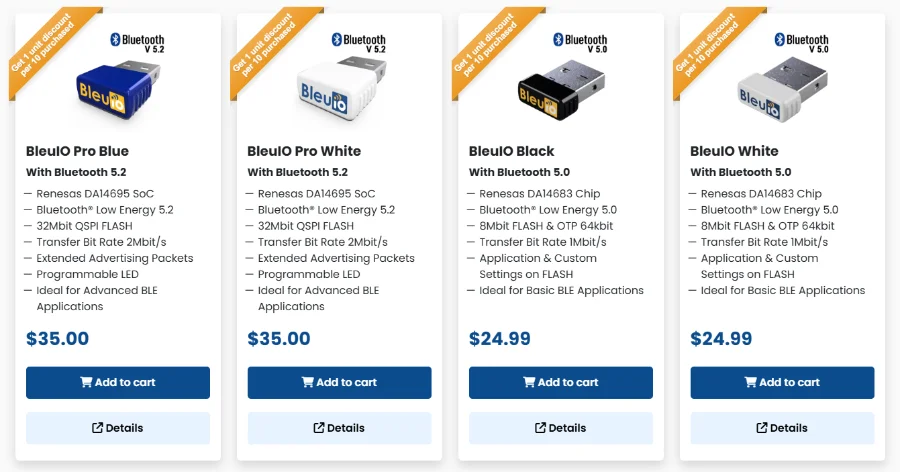
A screenshot from the BleuIO website showing their products and pricing, as of Nov 2025.53

Instead of relying on the operating system’s Bluetooth API, they provide their own API for interacting with the Bluetooth hardware. This gives the user more features and a consistent interface across different operating systems. For example, Windows only allows for one Bluetooth radio to be active at a time (via the OS Bluetooth stack).54 Just having one Bluetooth radio is not an issue if you use BleuIO since the dongles don’t utilize the Windows Bluetooth stack. The Python library Bleak lets you specify an adapter, but this parameter is ignored on Windows. You can interface with the dongles via either AT commands (over a USB CDC serial port) or via provided Python/Javascript libraries (I presume the libraries utilize the AT commands also).
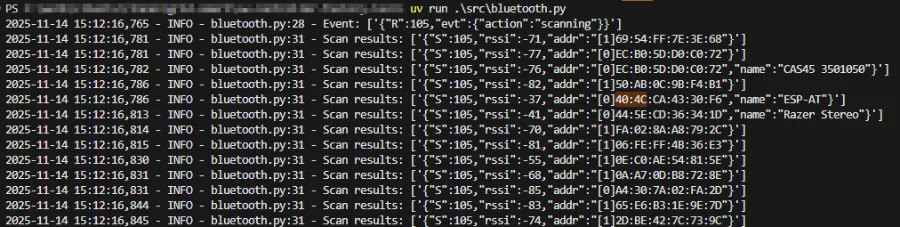
A screenshot of a Python script scanning for Bluetooth devices using a BleuIO dongle.

The BleuIO dongles are purchasable either from their website or through third party resellers such as DigiKey.

nRF52840 Dongle

The Nordic Semiconductor nRF52840 Dongle is a popular Bluetooth development dongle. It works well with the “Bluetooth Low Energy” GUI tool in the “nRF Connect for Desktop” application suite. With this tool, you can scan for Bluetooth devices, connect to them, read their GATT services and characteristics, and read/write/subscribe to them. You can also setup the dongle to have it advertise.
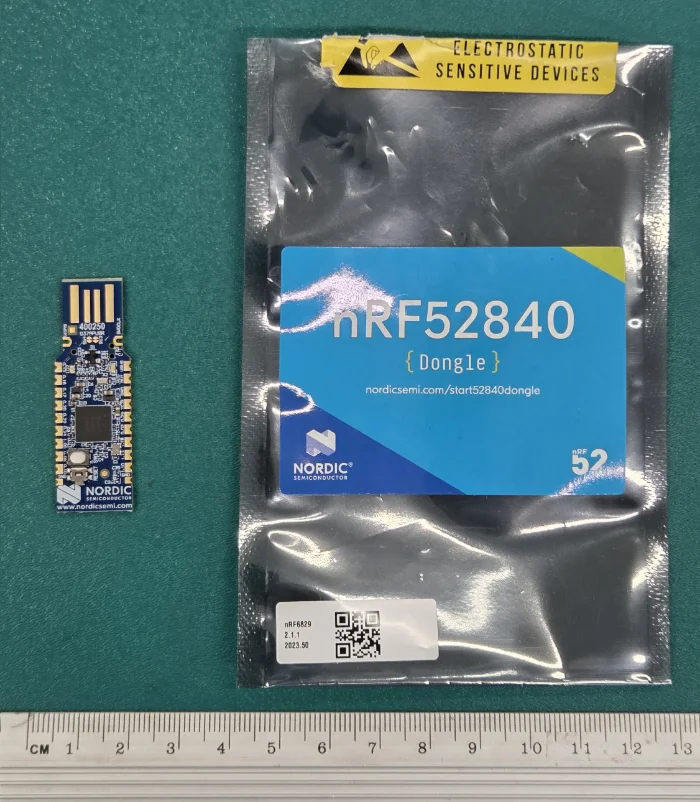
A photo of the Nordic Semiconductor nRF52840 Dongle.

OS Support for Bluetooth

Windows

Windows only allows for one Bluetooth radio (adapter) to be active at a time (via the OS Bluetooth stack).54 If you have multiple Bluetooth adapters (including built-in ones or dongles) and want to switch between them manually, you typically need to enable and disable Bluetooth devices from the Device Manager. Dongles that don’t use the Windows Bluetooth stack (e.g. BleuIO) are not affected by this limitation.

Windows supports AFH (adaptive frequency hopping) for Bluetooth devices, but is disabled by default. A registry key needs to be written to first to enable AFH. This enables a “shared spectrum model” in where Windows can tell Bluetooth adapters which channels to avoid as to prevent interference with Wi-Fi.54

Windows also allows Bluetooth mouse and keyboard devices to wake up Windows from sleep (S3) or hibernate (S4) system power states. For this to work, the Bluetooth device must be self-powered.54

Range Extenders

Nordic Semiconductor nRF21540

The nRF21540 is a range extender FEM (front-end module) IC for 2.4 GHz RF communications, specifically targeted towards Bluetooth.

Below is a picture of the contents of the nRF21540 DB (development bundle). It contains two boards:

  1. nRF21540 EK: An analogue nRF21540-only dev. board in which you can pass RF in and out.
  2. nRF21540 DK: A board with both a nRF52840 SoC and nRF21540 integrated together for fast single-board development.

The analogue board is good if you have your own custom 2.4 GHz signal you want to amplify, while the integrated dev. board is if you want an all-in-one rapid prototyping solution.

Nordic has added support for this board in the Nordic nRF SDK (which builds on the Zephyr SDK) as the target nrf21540dk/nrf52840 (nrf21540dk_nrf52840 on older NCS).
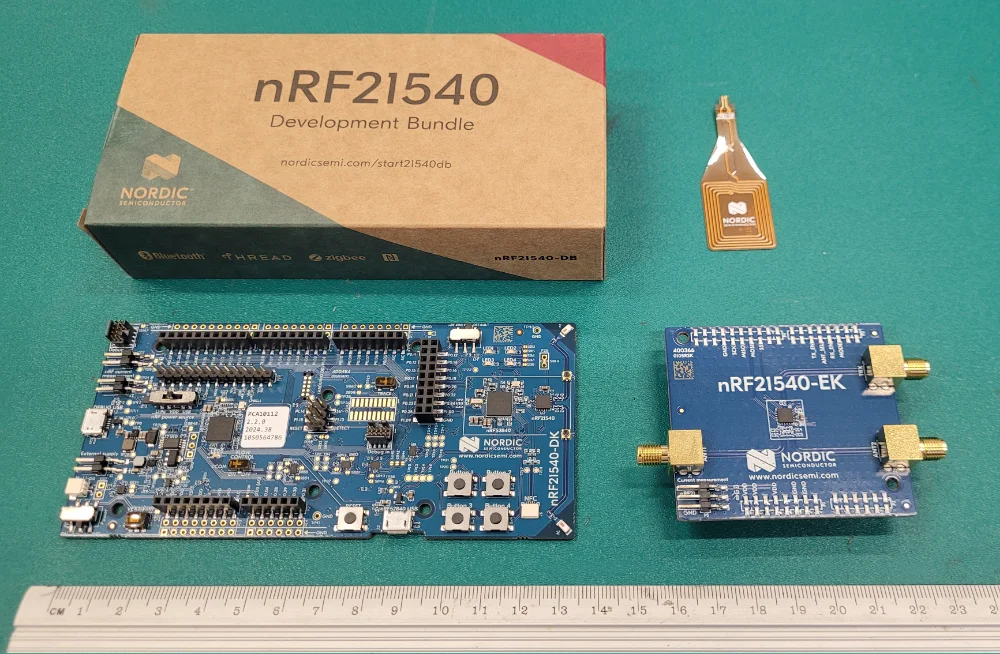
What’s in the box of the nRF21540 development bundle.

There is an “Bluetooth: Throughput” example which acts as a good starting point for development with the nRF21540 DK. When testing with two development kits you can configure one as Central and one as a Peripheral. Below is an example of the output you get from the Central shell:

==== Starting throughput test ====
PHY update pending
Connection parameters update pending
Connection parameters updated.
interval: 320, latency: 0, timeout: 1000
LE PHY updated: TX PHY LE 2M, RX PHY LE 2M
LE Data length update pending
Frame space update pending
LE data len updated: TX (len: 251 time: 2120) RX (len: 251 time: 2120)
The test is in progress and will require around 20 seconds to complete.
Frame space updated: frame space 150 us, PHYs 0x0000, spacing types 0x0000
Done
[local] sent 3256110 bytes (3179 KB) in 20002 ms at 1302 kbps
[peer] received 3256110 bytes (3179 KB) in 6578 GATT writes at 1319187 bps

The preferred PHY can be set via the shell with the config phy <preferred_phy> command:

Terminal window
uart:~$ config phy
phy - Configure connection interval
Subcommands:
1M : Set preferred PHY to 1Mbps
2M : Set preferred PHY to 2Mbps
coded_s2 : Set preferred PHY to Coded S2
coded_s8 : Set preferred PHY to Coded S8

For example, to test Coded S8 PHY run config phy coded_s8.

Regulations

The most crucial regulation that most engineers will find themselves concerned with is the transmit power of the Bluetooth signal. The transmit power is usually adjustable in firmware — not only to meet local regulations but also to optimize power and limit range on purpose (sometimes limiting range on purpose is useful — imagine if your credit card tap-to-pay worked from a kilometre away!).

In the EU, ETSI EN 300 328 limits Bluetooth transmission power to:55

  • 20 dBm EIRP if the device uses adaptive frequency hopping spread spectrum (adaptive FHSS) techniques
  • 10 dBm EIRP if it doesn’t

To implement adaptive FHSS, the device must:

  • Hop across at least 15 different channels
  • Detect and avoid channels in use by other devices

USA

In the USA the transmission power is more permissive, with the FCC limiting Bluetooth transmission power to +30 dBm but PSD (power spectral density) must be below 8 dBm / 3 kHz if no adaptive FHSS is implemented. There are two channels with exceptions:55

  • Bluetooth Channel 37 is limited to 18 dBm.
  • Bluetooth Channel 38 is limited to 15.3 dBm.

For 1 Mbps, 2 Mbps and 500 kbps Coded PHY, devices can use 30 dBm transmit power. 125 kbps coded PHY doesn’t meet the 8 dBm / 3 kHz PSD requirement, and TX power is capped at 14 dBm.56

If the device has adaptive FHSS, then the PSD restrictions go away.56

See the RF Spectrum Regulations page for more information.

Footnotes

  1. Wikipedia (2023, Apr 27). Bluetooth Special Interest Group. Retrieved 2023-05-24, from https://en.wikipedia.org/wiki/Bluetooth_Special_Interest_Group.

  2. Bluetooth SIG. About Us - Origin of the Bluetooth Name. Retrieved 2023-05-24, from https://www.bluetooth.com/about-us/bluetooth-origin/.

  3. Wikipedia (2021, May 16). Piconet. Retrieved 2023-05-24, from https://en.wikipedia.org/wiki/Piconet.

  4. Vijay K. Garg (2007). Wireless Personal Area Network — Bluetooth. Wireless Communications & Networking. Retrieved 2023-05-24, from https://www.sciencedirect.com/book/9780123735805/wireless-communications-and-networking.

  5. Bluetooth SIG. Part A. Logical Link Control and Adaptation Protocol Specification [specification]. Retrieved 2025-09-18, from https://www.bluetooth.com/wp-content/uploads/Files/Specification/HTML/Core-54/out/en/host/logical-link-control-and-adaptation-protocol-specification.html.

  6. Stack Overflow (2022, May). BLE L2CAP layer - segmentation vs fragmentation [forum post]. Retrieved 2025-09-18, from https://stackoverflow.com/questions/71504272/ble-l2cap-layer-segmentation-vs-fragmentation.

  7. Argenox. BLE Advertising Primer. Retrieved 2024-02-27, from https://www.argenox.com/library/bluetooth-low-energy/ble-advertising-primer/. 2 3 4 5 6

  8. Martin Woolley (2025, Jan 13). Bluetooth Core 5.0 Feature Enhancements. Bluetooth SIG. Retrieved 2025-08-04, from https://www.bluetooth.com/wp-content/uploads/2019/03/Bluetooth_5-FINAL.pdf. 2

  9. Bluetooth SIG (2026, May 19). Assigned Numbers [specification]. Retrieved 2026-05-21, from https://www.bluetooth.com/wp-content/uploads/Files/Specification/HTML/Assigned_Numbers/out/en/Assigned_Numbers.pdf.

  10. Bluetooth SIG. Part A. Data Types Specification [specification]. Retrieved 2026-05-20, from https://www.bluetooth.com/wp-content/uploads/Files/Specification/HTML/CSS_v11/out/en/supplement-to-the-bluetooth-core-specification/data-types-specification.html. 2

  11. Nordic DevZone. A question about the Supervision Timeout [forum post]. Retrieved 2026-06-18, from https://devzone.nordicsemi.com/f/nordic-q-a/14454/a-question-about-the-supervision-timeout. 2

  12. Silicon Labs. Optimizing Current Consumption in Bluetooth Low Energy Devices. Retrieved 2024-04-30, from https://docs.silabs.com/bluetooth/3.2/general/system-and-performance/optimizing-current-consumption-in-bluetooth-low-energy-devices. 2

  13. Apple Inc. Accessory Design Guidelines for Apple Devices (Release R29) [guidelines]. Retrieved 2026-06-18, from https://developer.apple.com/accessories/Accessory-Design-Guidelines.pdf.

  14. Apple Inc. (2017, Sep 26). QA1931: Using the correct Bluetooth Low Energy Advertising and Connection Parameters for a stable connection [technical Q&A]. Retrieved 2026-06-18, from https://developer.apple.com/library/archive/qa/qa1931/_index.html.

  15. Android Developers. BluetoothGatt [API reference]. Retrieved 2026-06-18, from https://developer.android.com/reference/android/bluetooth/BluetoothGatt.

  16. Android Open Source Project. platform/packages/apps/Bluetooth: res/values/config.xml [source code]. Retrieved 2026-06-18, from https://android.googlesource.com/platform/packages/apps/Bluetooth/+/d65009d%5E!/res/values/config.xml.

  17. Microsoft (2025, Nov 21). BluetoothLEPreferredConnectionParameters Class [API reference]. Retrieved 2026-06-18, from https://learn.microsoft.com/en-us/uwp/api/windows.devices.bluetooth.bluetoothlepreferredconnectionparameters.

  18. Linux kernel. net/bluetooth/hci_core.c [source code]. Retrieved 2026-06-18, from https://github.com/torvalds/linux/blob/master/net/bluetooth/hci_core.c.

  19. Kai Ren (2016, Mar 29). Bluetooth Pairing Feature Exchange [blog]. Bluetooth SIG. Retrieved 2026-06-25, from https://www.bluetooth.com/blog/bluetooth-pairing-part-1-pairing-feature-exchange/. 2

  20. Mike Ryan. mikeryan/crackle [GitHub repository]. GitHub. Retrieved 2026-06-25, from https://github.com/mikeryan/crackle.

  21. Kai Ren (2017, Jan 19). Bluetooth LE Secure Connections – Numeric Comparison [blog]. Bluetooth SIG. Retrieved 2026-06-25, from https://www.bluetooth.com/blog/bluetooth-pairing-part-4/. 2

  22. Novel Bits (2023, Oct 2). Coded PHY: Bluetooth’s Long Range Feature. Retrieved 2025-08-03, from https://novelbits.io/bluetooth-long-range-coded-phy/. 2 3

  23. Henry Anfang (2019, Dec 31). Bluetooth PHY - How it Works and How to Leverage it. Punch Through. Retrieved 2025-08-03, from https://punchthrough.com/crash-course-in-2m-bluetooth-low-energy-phy/.

  24. Wikipedia (2024, Jul 31). Frequency-shift keying [wiki]. Retrieved 2025-08-03, from https://en.wikipedia.org/wiki/Frequency-shift_keying.

  25. GitHub (2020, Mar 15). NordicSemiconductor > Android-BLE-Library > Issues > List of Coded PHY Supported/Tested Phones #166 [GitHub issue]. Retrieved 2025-08-09, from https://github.com/NordicSemiconductor/Android-BLE-Library/issues/166. 2 3 4 5 6 7

  26. Silicon Labs. Periodic Advertising [documentation]. Retrieved 2026-06-20, from https://docs.silabs.com/bluetooth/latest/bluetooth-fundamentals-advertising-scanning/periodic-advertising. 2 3

  27. Kai Ren (2019, Feb 28). What you need to know about Periodic Advertising Sync Transfer. Bluetooth SIG. Retrieved 2026-06-20, from https://www.bluetooth.com/blog/periodic-advertising-sync-transfer/.

  28. Henry Wong (2026, Jun 12). Consumer audio is going all in on Auracast broadcast audio: Are you keeping up?. Bluetooth SIG. Retrieved 2026-06-29, from https://www.bluetooth.com/blog/consumer-audio-is-going-all-in-on-auracast-broadcast-audio-are-you-keeping-up/. 2

  29. Nathan Block. The 3 Updates Application Developers Need to Know about Bluetooth Core Specification Version 5.3. Texas Instruments. Retrieved 2026-06-30, from https://www.ti.com/document-viewer/lit/html/SSZT113. 2

  30. Niclas Granqvist and Alfredo Perez (2026, Feb 10). Bluetooth Shorter Connection Intervals: Paving the Way for Bluetooth Innovation. Logitech. Retrieved 2026-06-30, from https://www.logitech.com/blog/2026/02/10/bluetooth-shorter-connection-intervals-paving-the-way-for-bluetooth-innovation/. 2

  31. Avi Negrin (2026, May 1). How Bluetooth Shorter Connection Intervals will impact the next generation of wireless innovations. Bluetooth SIG. Retrieved 2026-06-29, from https://www.bluetooth.com/blog/how-bluetooth-shorter-connection-intervals-will-impact-the-next-generation-of-wireless-innovations/. 2

  32. Joel Kauppo (2025, Nov 5). What’s new in Bluetooth Core 6.2: An overview. Nordic Semiconductor. Retrieved 2026-06-30, from https://devzone.nordicsemi.com/nordic/nordic-blog/b/blog/posts/whats-new-in-bluetooth-core-6-2-an-overview. 2 3

  33. Novel Bits (2025, Dec 16). Bluetooth LE Shorter Connection Intervals: A Hands-On Guide with the nRF54L15. Retrieved 2026-06-30, from https://novelbits.io/ble-shorter-connection-intervals-hands-on-nrf54l15/. 2

  34. Martin Woolley (2017, Aug 1). BlueTooth Blog - An Intro to Bluetooth Mesh Part 2. BlueTooth SIG. Retrieved 2023-05-24, from https://www.bluetooth.com/blog/an-intro-to-bluetooth-mesh-part2/.

  35. Silicon Labs. AN1137: Bluetooth Mesh Network Performance. Retrieved 2023-05-24, from https://www.silabs.com/documents/public/application-notes/an1137-bluetooth-mesh-network-performance.pdf.

  36. Nanjing Qinheng Microelectronics Co., Ltd. Bluetooth serial port transparent chip: CH9141. Retrieved 2024-11-20, from https://www.wch-ic.com/products/CH9141.html. 2

  37. Cypress Semiconductor (2016, Nov 23). CYW20702 - Single-Chip Bluetooth Transceiver and Baseband Processor [datasheet]. Retrieved 2025-02-05, from https://www.alldatasheet.com/datasheet-pdf/download/902264/CYPRESS/BCM20702.html.

  38. Wikipedia (2024, Sep 12). CSR plc [wiki]. Retrieved 2025-02-05, from https://en.wikipedia.org/wiki/CSR_plc.

  39. Shenzhen SHSD Technology Co.,Ltd. HC-05 Data Sheet - Bluetooth to Serial Port Module [datasheet]. Retrieved 2025-09-19, from https://cdn.awsli.com.br/945/945993/arquivos/HC-05-BOARD.pdf.

  40. ElectronicWings. Bluetooth Module HC-05 Pinout, AT Commands & Arduino Programming. Retrieved 2025-09-19, from https://www.electronicwings.com/sensors-modules/bluetooth-module-hc-05-.

  41. Bluetooth SIG (2003, Jun 5). RFCOMM with TS 07.10 Serial Port Emulation - v1.1 [specification]. Retrieved 2025-09-18, from https://www.bluetooth.com/specifications/specs/html/?src=RFCOMM_v1.1/out/en/index-en.html#UUID-d6d80781-0c47-2246-5814-6a44e22f6c27.

  42. Nordic Semiconductor. Nordic UART Service (NUS) [website]. Retrieved 2025-09-16, from https://docs.nordicsemi.com/bundle/ncs-latest/page/nrf/libraries/bluetooth/services/nus.html.

  43. Microchip (2023, Nov 9). Transparent UART service for BM70/RN4870 [website]. Retrieved 2025-09-16, from https://developerhelp.microchip.com/xwiki/bin/view/applications/ble/android-development-for-bm70rn4870/transparent-uart-service-for-bm70rn4870/.

  44. Texas Instruments (2015). TI Serial Port Service (SPS) - Service and characteristic description [pdf]. Retrieved 2025-09-16, from https://www.ti.com/lit/ug/tidua63/tidua63.pdf. 2

  45. u-blox (2021, Nov 29). u-connectXpress - Bluetooth Low Energy Serial Port Service - Protocol specification [pdf]. Retrieved 2025-09-19, from https://content.u-blox.com/sites/default/files/u-connectXpress-LowEnergySerialPortService_ProtocolSpec_UBX-16011192.pdf.

  46. Silicon Labs. SPP (Serial Port Profile) over BLE [documentation]. Retrieved 2025-09-19, from https://docs.silabs.com/bluetooth/2.13/bluetooth-code-examples-applications/.

  47. Matthew Ford (2017, Nov 15). Bluetooth V4, Bluetooth V5 (BLE) Problems and Solutions for General Purpose Control [article]. Forward Computing and Control Pty. Ltd. Retrieved 2025-09-16, from https://www.forward.com.au/pfod/BLE/BLEProblems/index.html.

  48. loginov-rocks. loginov-rocks/Web-Bluetooth-Terminal [GitHub repository]. GitHub. Retrieved 2025-09-15, from https://github.com/loginov-rocks/Web-Bluetooth-Terminal.

  49. noble. noble/noble [GitHub repository]. GitHub. Retrieved 2025-09-19, from https://github.com/noble/noble.

  50. BleuIO. Homepage [website]. Retrieved 2025-11-11, from https://www.bleuio.com/.

  51. Microsoft. Learn > Windows > Windows Drivers > Bluetooth FAQ. Retrieved 2025-11-14, from https://learn.microsoft.com/en-us/windows-hardware/drivers/bluetooth/bluetooth-faq. 2 3 4

  52. Michael Spörk (2025, Feb 6). Boosting Bluetooth Range: Understanding TX Power Regulations in the EU & US. Dewine Labs. Retrieved 2026-05-22, from https://dewinelabs.com/boosting-bluetooth-range-understanding-tx-power-regulations-in-the-eu-us/. 2

  53. Silicon Labs. TX Power Limitations for Regulatory Compliance (ETSI, FCC) [documentation]. Retrieved 2026-05-25, from https://docs.silabs.com/bluetooth/5.0/bluetooth-general-system-and-performance/tx-power-limitations-for-regulatory-compliance-etsi-fcc. 2